
A "Hello, World!" program for digital twins
You might be familiar with the concept of a "Hello, World!" program. If not, basically such example programs are usually used to introduce programming languages or frameworks by providing the simplest possible fragment that a user can reproduce, run and get a first output (e.g. printing "Hello, World!"). In this article, we try to do something similar for presenting the concept of a digital twin powered by our programmable database, GreyCat!
A digital twin is a computer application that reflects an existing system from the real, physical world, within the virtual, digital domain. The goal of such a digital copy is to provide an easy way to access and analyze data coming from the system and act accordingly. With this in mind, it is evident that even a "Hello, World!" digital twin can not be represented with a few lines of code as the reflected real world system needs to be complex enough to be able to play around and gain actually tangible insights.
Cyclocity
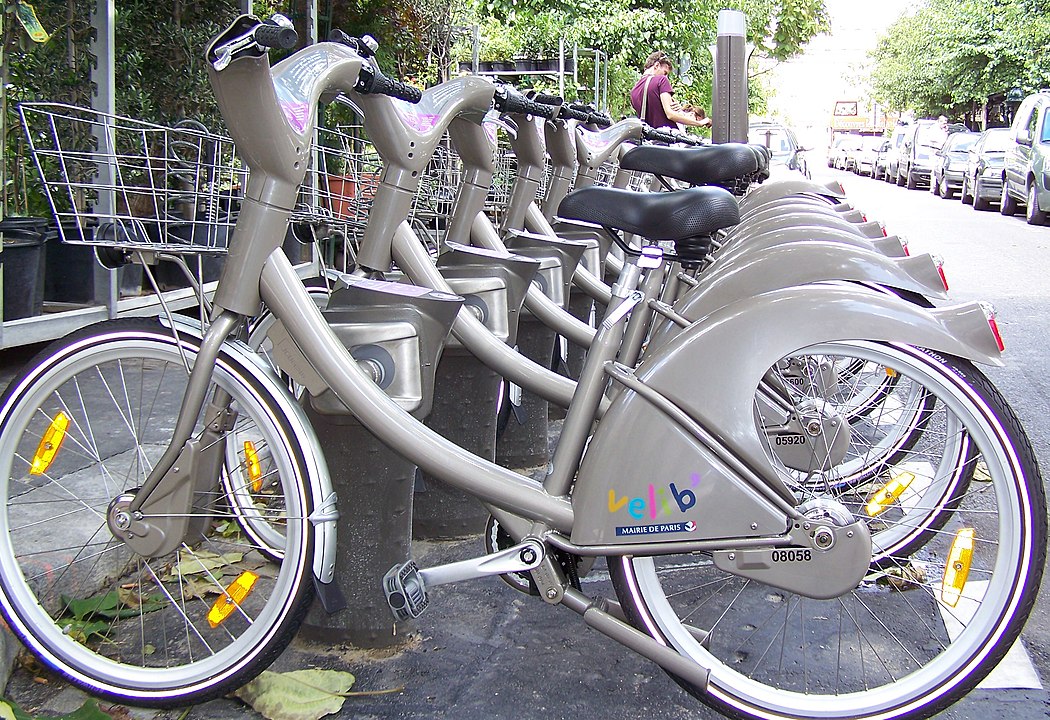
The physical system of choice for our "Hello, World!" digital twin, is the rental bike service of JCDecaux, also known as Cyclocity. Cyclocity offers rental bike services in many cities across Europe as well as Japan. Within one city, users can pick a bike at any station and deposit it again on a different station of that cluster (usually across one city, and its satellite locations). Fortunately for us, JCDecaux offers an API that anyone can use to access live availability data for bikes at all their stations. We used this API to build a digital twin providing access to the live data via a map interface, as well as creating profiles of the usual availability at each station at different times of the week. The whole backend, written in GreyCat language (GCL), requires less than 500 lines of code and the majority of this is due to offering importing csv data as well as querying new data via the API.
Coding a digital twin powered by GreyCat
The code to run the application locally on your own machine is available on github. We will not go into all the details of the code but take a quick look at some of the important parts to showcase the simplicity of creating digital twins with GreyCat. The following code snippet models the relationships of the bike rental system:
use util;

var stations_by_geo: nodeGeo<node<Station>>;
// will contain all contracts indexed by contract name
var contracts_by_name: nodeIndex<String, node<Contract>>?;

type Station {
    number: int;
    position: geo;
    // will contain all static information about the Station
    // you will want to put information that is not important inside a node to avoid loading it into memory on every Station resolve
    detail: node<StationDetail>;

    // will contain all dynamic data of a station indexed by the last update timestamp
    records: nodeTime<StationRecord>;

    //The stations Contract,  Belongs To relationship in sql
    contract: node<Contract>;

    // build up profile of the availability
    profile: node<StationProfile>;
}

type StationDetail {
    name: String;
    address: String;
    banking: bool;
    bonus: bool;
}

type StationRecord {
    status: StationStatus;
    bike_stands: int;
    available_bike_stands: int;
    available_bikes: int;
}
enum StationStatus {
    open("open");
    closed("closed");
}

type Contract {
    name: String;
    commercial_name: String?;
    country_code: String?;
    cities: Array<String>?;

    //will contain a list of refs to all stations of the contract indexed by the number property, Has Many relationship in sql
    stations: nodeIndex<int, node<Station>>;
}
Let's dig into this a bit.
First we import the util module, which contains the GaussianProfile type which we will need for profiling.
Next we declare two module variables, which have a special meaning in GCL.
GreyCat is a programmable database that stores all data as a graph, and module variables serve as entry points to the graph.
For example, we model the index of rental stations like:
var stations_by_geo: nodeGeo<node<Station>>;
The variable is of type nodeGeo, which is a GCL data structure that allows us to store any data type (here the custom type Station) indexed by geographic location (i.e. longitude and latitude).
In our code we can then retrieve individual stations, given the geo, and access all information stored within the Station type in an object-oriented way.
This is especially useful, as the frontend of this application features a map where the user can select stations by clicking on it.
Alternatively, we could also create an integer or time based indexation in GCL, but that is a topic for another article.
The remainder of the above code creates an object-oriented model of the data we get from the JCDecaux API.
The semantics should be fairly easy for anyone familiar with some other object-oriented programming language.
Another important part of this digital twin, is the ability to profile the availability at each station, i.e. to condense the historical data into tangible insights that operators could use to improve the rental system and plan for future extensions.
In the code above you can see that each Station has an attribute called profile of type node<StationProfile>. Why putting it in a node? Because of performance!
Whenever we put objects inside a node, we enable us to only fetch a pointer (64 bit identifier) in a first step and only resolve the internal object (which might be huge) when we actually need it. In this case, the profile can indeed become a rather big object, and we want to make sure that we do not resolve this every time we access the parent Station object.
Below you can see the code of the StationProfile type:
type StationProfile {
    //24 * 7 slots, one for each hour of the week, will help to visualize the station activity in a typical week
    hourlyProfile: GaussianProfile;

    fn updateProfile(t: time, data: StationRecord) {
        if (data.bike_stands > 0) {
            //convert the time to the correct slot
            var quantizer = Quantizer::new();
            quantizer.configure([DenseDim { min: 0, max: 6, step: 1 }, DenseDim { min: 0, max: 23, step: 1 }]);
            var date = t.toDateUTC();
            var slot = quantizer.quantize([date.dayOfWeek(), date.hours()]);

            this.hourlyProfile.add(slot, data.available_bikes as float / data.bike_stands as float);
        }
    }

    fn profileToTable(): Table {
        var table = Table::new(24);

        var endSlot = 24 * 7;
        var startSlot = 0;

        while (startSlot < endSlot) {
            var row = startSlot / 24;
            var col = startSlot % 24;

            var val = this.hourlyProfile.avg(startSlot);

            table.set(row, col, val);
            startSlot++;
        }
        return table;
    }
}
The type features a GaussianProfile, a utility type offered by GreyCat, to collect data in slots and extract the properties of the underlying gaussian distribution (e.g. mean, std, etc.). Here we use one slot for each hour of each weekday. The StationProfile also provides functions to update the internal GaussianProfile and return it as a table which we use to display the profile on the user interface.
We will not dig further into the importer or frontend code here, but feel free to do so on your own! You will see that the frontend is written in typescript and uses some web components we offer with GreyCat to help to plot data curves and profiles.
Digital twin in action!
If you downloaded the code and followed the setup, you should be able to see the frontend application in your browser. The app features two main elements. On the left we offer a map that shows all biking stations and visualizes the availability ratio of each station with a colored circle using the well-known viridis colormap (purple = empty, yellow = full). The demo comes with 2 weeks of data, and we offer a slider to move over this period in steps of 1 hour. As a nice example, head over to the city of Lyon in the south-east of France and click the play button next to the slider to observe how citizens seem to use the rental bikes to head to the offices in the center of the city and ride back to the outer city after work!

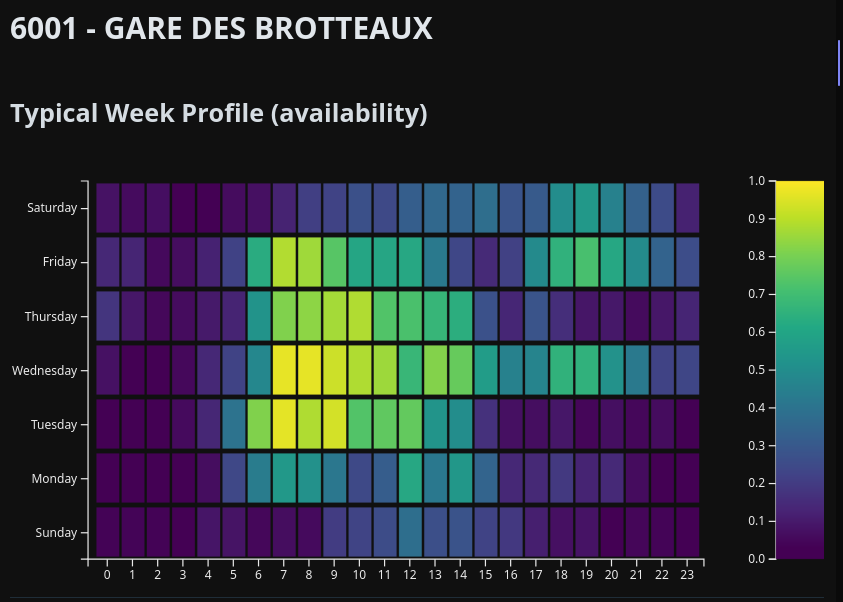
To confirm this observation, we can use the other main feature offered on the right side of the application window. Here we can display the profile of a selected station which we build for the entire available data. See below the profile of one of the central stations near the train station. The profile clearly shows a generally high availability on weekdays during the usual office hours. Although, Monday seems to be an outlier, maybe this is the preferred home-office day in the area? The availability going down towards noon could also indicate that bikes are redistributed, which is a service that JCDecaux is offering to cities. Note that all timestamps are given in UTC, which also shifts the profile slots. We did not want to bloat this simple demo with another API access to convert to the respective local time zones of the station.
Wrap-up
This article presents an easy, "Hello, World!" style, digital twin for the rental bike system of JCDecaux. Maybe we piqued your interest in GreyCat and you are now thinking about all the great potential your business could unlock by creating a digital twin and using it to analyze your system! Feel free to play around and extend this demo and explore the vast features of GreyCat which we can not cover fully in a blogpost like this. Don't hesitate to contact us to get more information on our technology or discuss how we could help your specific business case!